Claude Code ships with search and fetch. They work fine for public pages with clean HTML. The moment you need anything behind a login, inside a JS-rendered app, or across multiple sites in parallel, they hit a wall.
This is not a model problem. The tools just were not designed for that.
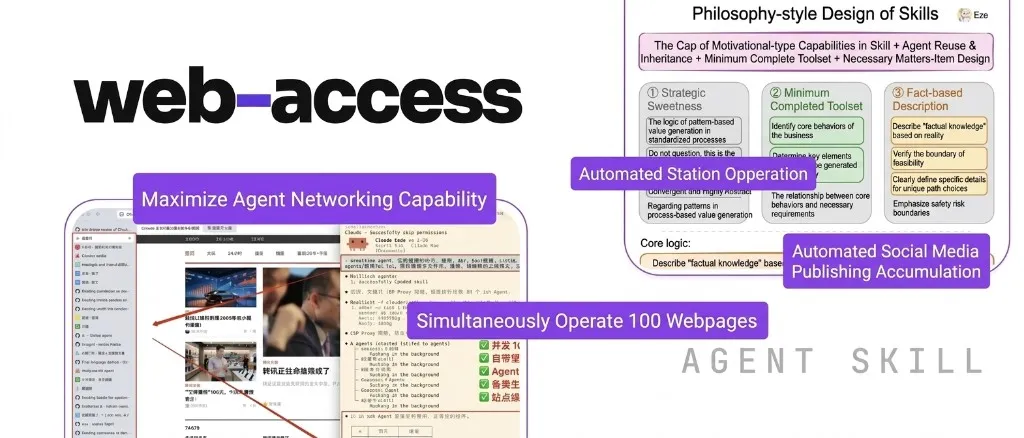
Independent developer Eze (一泽Eze) built web-access to close that gap — an Agent Skill for Claude Code (and OpenClaw) that adds real browser automation, parallel tab management, and automatic site-experience memory. It is published at eze-is/web-access under the MIT license.
Language note: the skill is currently Chinese-only. There is no official English version yet. The installation prompt in this article has been translated, but the skill’s internal documentation loads in Chinese. Keep that in mind if you are working with a model that performs better on English context.
What Claude Code’s built-in web tools cannot do
Claude Code gives agents two web tools:
search— queries Brave Search and returns summariesfetch— pulls the plain-text content of a URL
OpenClaw’s web_search and web_fetch are the same pattern.
Neither handles authenticated sessions. Neither renders JavaScript. Neither supports running browser operations in parallel. For any platform that actively blocks scraping — which includes most social and productivity apps — both tools return nothing useful.
The usual workaround is to install Playwright or Agent Browser CLI and figure out the integration yourself. Even then, the agent still has to decide on its own when to search, when to fetch, and when to open a browser. Without guidance, most models pick one approach and stay with it regardless of whether it is working.
What web-access adds
The most striking demo: 10 sub-agents open Xiaohongshu, Weibo, Bilibili, BOSS Zhipin, Huxiu, and several other platforms simultaneously. Each creates its own background tabs, reads content, and reports back. The main agent receives only the final summary. The user’s browser focus is never touched.
Beyond parallel research, the skill handles posting to social platforms (open editor, fill text, upload images, submit), navigating login-gated systems like the US visa appointment portal, and automatically solving certain CAPTCHA challenges — all without site-specific custom rules.
Three design choices that make it work
A judgment framework, not a decision tree
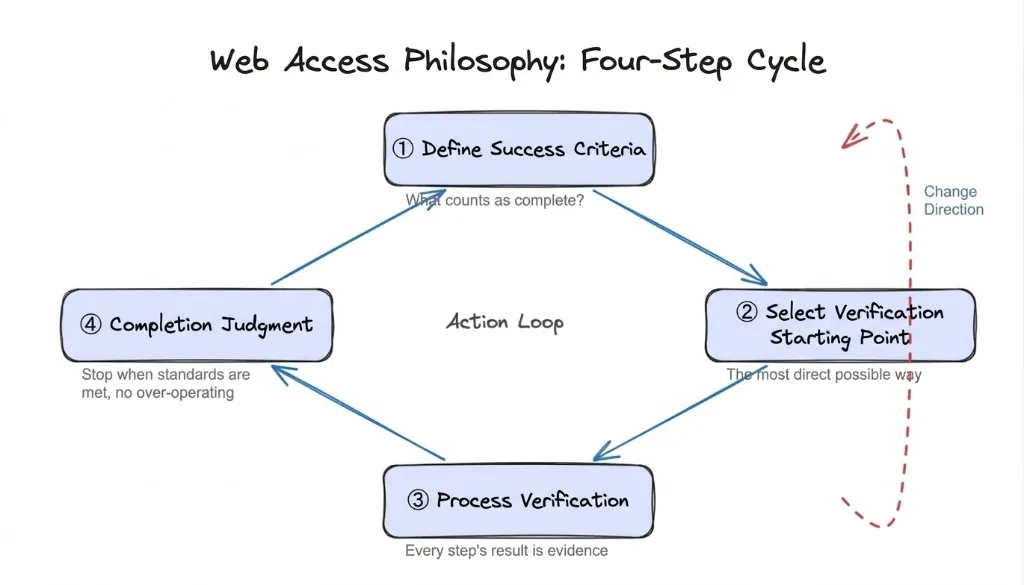
The skill does not tell the agent “use CDP for Xiaohongshu.” Instead it gives the agent a four-step reasoning loop: define what success looks like, pick the most direct starting approach, treat every result as evidence to update the plan, and stop once the goal is met.
No specific paths are hardcoded. The agent applies the framework to sites it has never seen before.
A complete tool set mapped to what humans actually do online
Humans navigate the web with three actions: search, read, act. The skill maps each to a specific tool:
- Search →
WebSearch - Read →
WebFetch/curl/ Jina (for token-efficient Markdown extraction) - Act → browser CDP
Each tool has explicit capability boundaries documented in the skill. The model chooses based on the task instead of defaulting to whatever it used last.
Chrome’s native CDP was chosen over Playwright because native WebSocket traffic is harder for anti-scraping systems to flag, and it reuses the user’s existing Chrome session — login state included, no per-site re-authentication.
Automatic site-experience accumulation
After each successful browser session, the agent writes what it learned about that site — valid URL patterns, DOM selectors, known failure modes — to a domain-keyed file in references/site-patterns/. On the next visit, it reads the file and skips the exploration phase.
The difference in practice:
| No experience file | With experience file | |
|---|---|---|
| Tool calls | 13 | 3 |
| Time | ~1m 50s | ~12s |
| Reduction | — | 77% fewer steps / 89% faster |
(Task: find a specific creator’s profile page on Xiaohongshu via CDP.)
Experience files are dated and treated as hints, not facts. If a site changes and the cached approach fails, the agent falls back to general mode and updates the file automatically.
Installation
Copy this and send it to your agent:
Help me install the web-access skill. The repository is at https://github.com/eze-is/web-access. This skill was originally designed for Claude Code — before installing, please understand its core principles and working logic, then adapt it to your agent's architecture and local environment so it integrates naturally rather than being ported over mechanically.
The agent downloads the skill and configures the environment without any manual steps.
Prerequisites:
- Latest Chrome installed
- Remote debugging enabled: open
chrome://inspect/#remote-debuggingand checkAllow remote debugging for this browser instance - Disable Chrome DevTools MCP and Playwright MCP if active — multiple browser automation layers cause the model to second-guess tool selection
Language caveat: once installed, the skill’s internal documentation is in Chinese. The installation prompt above works, but the loaded context will be Chinese-language.
Eze’s write-up on the skill also contains a design principle worth keeping:
A skill that brings out the model’s full capability = Agent strategy philosophy + minimal complete tool set + necessary factual context
The distinction he draws: a prompt contains two kinds of content — technical facts (raw material for reasoning) and experiential rules (a ceiling on how far reasoning goes). They look identical when you write them. They only diverge when something breaks. His approach: write the philosophy and the facts, skip the rules, and let the model judge.
If you are using Claude Code and want browser automation without the Playwright setup overhead, web-access is the most direct path right now. The full design documentation is in SKILL.md in the repository.